Thursday, August 30, 2012

Sony Introduces Inexpensive Tier for Music Unlimited Service

On Wednesday Sony Network Entertainment International announced a €4.99/US $4.99 per month tier, called "Access," to its Music Unlimited subscription service.

Sony is employing a familiar marketing strategy by placing a premium on mobility. This new tier establishes a basic level of services that provides listeners access to Music Unlimited on PCs and Sony PS3 gaming consoles. The existing tier, which costs €9.99/US $9.99 per month and has access to the same catalog, adds access from a variety of Android-based smartphone and tablet apps.

 
The lower tier of service now anchors the higher level of service. Vice President & General Manager, Global Digital Video and Music Services, tells Billboard.biz customer research shows mobile provides a higher level of utility most Sony customers expect. "Obviously music for a vast majority of people is a mobile experience. A lot of our focus is going to be on the premium [service] but we needed to have a second tier for folks who that option is not quite as important."

Music Unlimited is Sony's cloud-based music subscription service with 16 million licensed tracks. The service is available in 17 countries including the world's two largest recorded music markets, the United States and Japan. Music Unlimited can be accessed through Sony consumer electronic devices such as PlayStation3 gaming consoles, Bravia televisions, Blu-ray DVD players. Music Unlimited apps can also be installed on Android and iOS mobile apps.

In addition, to target consumers beyond the people buying its consumer electronics, Sony has introduced a 14-day, no-credit card service trial of the €9.99/US $9.99 premium service.

Billy Joel Signs Global Publishing Deal With Rondor and Universal

The Universal Music Publishing Group (UMPG) and its subsidiary Rondor Music International have landed a big one. The companies have signed Billy Joel to an exclusive worldwide publishing agreement.

Rondor and Universal will supplant EMI Music Publishing in foreign territories in handling Joel's catalog. And for the first time since Joel regained control of his music publishing in the 1980s, the artist's camp is using an outside administrator in the United States to manage his song portfolio.

"There are few songwriters in the history of music that have created a catalog of such hits, depth and quality," UMPG chairman/CEO Zach Horowitz said in a statement. "With Rondor's distinctive focus and care, and UMPG's global scale, administrative infrastructure and network of worldwide sync specialists, we are uniquely positioned to maximize the extraordinary opportunities that exist for Billy's music."

The game plan going forward is simple: its synchronization with a capital "S." That's because in the past, Joel's songs have hardly been used in TV, movies and commercials.

"Its amazing to me there is that nothing is happening with the catalog in films, TV and commercial," Horowitz says. "It seems impossible."

But that is in fact the case, he adds. It turns out that in the past Joel's music has found its way into synchronization uses when music supervisors initiated the opportunity, according to UMPG executives.

Could it be because Joel regards his music as too personal and precious to have it used in commercials and movies? Indeed, that was a concern that the UMPG executives initially had and when they canvassed music supervisors on that point, they found that found most of them were under that impression. But if that was the case in the past, it's no longer an issue now, Horowitz says.
"Joel regards his songs as his children, and as they grew up he put them through school, college and got them their first job," Horowitz says. Now, he feels it is time for his songs to go to work for him."

In addition to generating revenue, Horowitz says he believes synchronization will play a larger role for Joel's catalog. Since hit radio no longer plays Joel's music and the artist himself put out his last album, "River Of Dreams" (1993), there are teenagers who have grown up without being familiar with Joel's music. Consequently, there is a generation or two that has missed out on his music, as well as new generations to introduce to his music, Horowitz says, which is why synchronization opportunities are so important going forward.

Moreover, the songs within the catalog easily lend themselves to synchronization opportunities.

"His songs are melodic and memorable, and he writes conversationally in universal themes that are timeless and borderless," Rondor president Lance Freed said in a statement. "Billy's music is as important to his era as George Gershwin and Irving Berlin's were to theirs."

Standards written by Joel include "Just the Way You Are,"  "Only the Good Die Young," "Movin' Out," "Piano Man," "New York State of Mind," "You May Be Right," "Pressure," "Don't Ask Me Why," "She's Always a Woman," "My Life," "It's Still Rock and Roll to Me," "Tell Her About It," "Uptown Girl," "The Longest Time," "Say Goodbye to Hollywood," and "We Didn't Start the Fire."

In order to make sure that music users get the message, Freed says the company plans to have two events -- one on the East Coast and one on the West Coast. They will aim to bring in music supervisor, advertising executives and the heads of music production at film studios to re-introduce them to Joel and his music, and let them know "Billy's music is here, great, and available."

Centric Drops (New Single)

NEW SINGLE FROM TRIFE & CENTRIC
OH LORD!!

Wednesday, August 29, 2012

Redirect Your BlogSpot Blog (or Any Blog-Post) To Some Other Blog/Webpage

[Blogger_Meta_Redirection.jpg]This tutorial will help you to redirect your blog or any particular blog post to any other web address (a blog, website or a webpage).
You can do this redirection by adding a single line of code to your blog. This is called Meta-Redirect (also meta-refresh).

Live Example:
http://Google.BlogSpot.com redirects to http://GoogleBlog.BlogSpot.com

Instructions To Follow:

STEP #1
Log in to Blogger, go to Layout -> Edit HTML

STEP #2
Now find this code:

<head>
And immediately BELOW/AFTER this code, add this one:
<meta http-equiv="refresh" content="3; url=http://bloggerstop.net/" />
And save the template.
Now, your blog will now redirect to BloggerStop.net after 3 seconds (3 seconds countdown will start only after your blog has been completely loaded).

When and How to use it:
1. If you have two blogs, and want to use only one blog, then you can redirect all the traffic of Blog-2 to Blog-1, and keep blogging at Blog-1. This will get you some additional traffic.
2. If you are working on your blogs template/any widget, then temporarily redirect your blog traffic to an under-construction webpage. [In this case, apply this redirection to all but one page of your blog, where you can work and see the changes you are trying to implement - see MODIFIED CODE #1]
3. If you have updated an old post with a new one, then you can update your older post with a message similar to this one: You will be redirected to the newer/updated version of this post in 5 seconds and then redirect the readers to the updated post. [see MODIFIED CODE #2]

MODIFIED CODE #1
Redirect all your blog pages EXCEPT one page/blog-post:
Use this code instead of that in STEP #2
<b:if cond='data:blog.url != "SPECIFIC_BLOG-POST_URL"'>
<meta http-equiv="refresh" content="3; url=http://bloggerstop.net/" />
</b:if>

MODIFIED CODE #2
And use this code, to Redirect ONLY a particular post to some other post.
<b:if cond='data:blog.url == "SPECIFIC_BLOG-POST_URL"'>
<meta http-equiv="refresh" content="3; url=http://bloggerstop.net/" />
</b:if>

6 Tips to Get People to Join Your New Forum

A Bloggers Community © Baratunde
Starting a new forum can be daunting, especially if you don't know where you're going to find the people you need to keep it active. Luckily, there are a few steps you can take that will go a long way toward turning your new posting ground into a vibrant and busy internet community. Read on for a few tips you can do that will encourage new people to join your forum.

1. Be Active In Your Own Forum
Nothing makes a forum seem dead quite like an owner who doesn't post. Make sure you start a topic at least once every day to make it clear that you are an active forum participant. Try to make at least one appearance in every thread on a new forum as long as it remains feasible to do so. This will let your budding community know that you are active and interested in what everyone is saying.

2. Stay Visible In Your Niche

If you have a forum about car parts, visit other forums and blogs about car parts and make a valuable contribution. Don't advertise your forum directly unless you are in an advertising section, but make yourself an active member of as many car part communities you can find.

Stick a short note about your forum in your posting signature with a link. If you are active and helpful wherever you go, you will find that many of the other people reading in these communities will be interested in checking yours out.

3. Encourage Forum Members To Help Your Community Grow

If the members you already have are happy with your community and find it helpful, they will probably be more than willing to encourage other people to join. Talk about trying to grow your forum in a sticky post and give community members simple ways to share your link with their friends.

Give your forum community an HTML link with text to copy and paste to make sharing a link simple. Use buttons that allow them to share a forum link with various social networks as well. If a forum member mentions sharing your forum somewhere, be sure to thank them.

4. Help Search Engines Find Your Forum

Many lists will tell you to submit your forum to search engines to get it listed, but sometimes this can actually slow you down. If you are actively promoting your forum with signature links in other blogs and communities, chances are major search engines already know it is there.

Help these search engines know where to list your forum by making sure most of the links pointing to your forum use the text people will be likely to use to look for what you provide. If your forum is about car parts, make sure your links say "car parts community" or something similar. Any time you write something for a blog or website include a note about your forum with a properly formatted link.

5. Make Sure Your New Forum Looks Good

No one wants to use a forum that is unreadable or painful to look at. Keep the interface clean and make sure the colors and skins you choose are nice looking and highly readable. If your forum members say something is making things hard to read, listen to them and change it. Customize everything, from the smiley options to member titles. Nice custom options will help your forum stay memorable.

6. Contests Can Be Useful

Run a few contests that will increase meaningful post counts. Host a contest requesting meaningful posts about a specific topic, and use the voting options that come with most forums to have the community vote on the winner. For prizes, you can give out anything from physical items to custom forum titles.

Add A Free Forum To Your Blogger/BlogSpot Blog

A Bloggers Community © Baratunde
Forums are entirely different from blogs. Forums let your readers interact with each other, create new topics/discussions and some of them even moderate the forums along with you.
1. Forum from Wikipedia.
2. The popular Digital Point Forums

A few weeks back, even I started a forum - BloggerStop-Community (closed due to some problems) on a sub-domain of my website (main.bloggerstop.net).


[Please join and participate in the NEW BloggerStop Forums]

But in free Blogger/BlogSpot blogs, you are not allowed to create a sub-domain or even a new directory (an online folder). So hosting a forum seems impossible, but not anymore. Before you read any further, see these 2 examples:

1. A Blogger Blog completely changed in to a Forum.
2. A simple (static) page on a normal Blogger blog, converted to a Forum.

Instructions to Add a Forum To Your Blog
:

STEP #1:
Create and publish a new static page on your blog, exclusively for a forum. As an example, check out my forums-static-page here:

http://bloggerstop.net/p/bloggerstop-community.html

STEP #2:
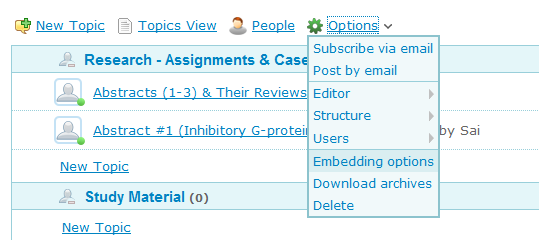
Create a new forum at Nabble: Free Forums at Nabble [You will do this within 5 minutes]
Copy the HTML code...


STEP #3:
Go to Blogger Dashboard -> Design -> Edit HTML and mark the tick-box "Expand Widget Tempaltes".

STEP #4:
Find (CTRL+F) this code, in your template:
<div id='content-wrapper'>

If you are not able to find the above mentioned code, then find (CTRL+F) this one (for new templates made for Blogger Template Designer)
<div class='columns fauxcolumns'>

And immediately ABOVE/BEFORE it, paste the code you got from Nabble, with this ADDITIONAL code (Highlighted in BLUE and RED):

<b:if cond='data:blog.url == &quot;http://bloggerstop.net/p/bloggerstop-community.html&quot;'>
PASTE_CODE_FROM_NABBLE_HERE
</b:if>
NOTE (Important): Replace the code in RED, with the link to your forum-page.

STEP #5:
Save your temaplate.

STEP #6:
This step will HIDE everything from your blog (post content, sidebar widgets etc.) and ONLY forum will be visible in your forum-page.
Find this code in your template:
</head>
And immediately ABOVE/BEFORE it, paste this code:
<b:if cond='data:blog.url == &quot;http://bloggerstop.net/p/bloggerstop-community.html&quot;'>
<style type='text/css'>
#content-wrapper {
display:none !important;
}
.columns, .fauxcolumns {
display:none !important;
}
</style>
</b:if>
NOTE (Important): Replace the code in RED, with the link to your forum-page.

That's it, a new forum on your blog is ready.
Now, Invite your readers and friends to join you at your forums.


NOTE: If you want to replace an entire blog with a forum, as shown in the first example (Forum In A Blogger Blog), then, first create a new blog. Download the template as a backup. Now, replace everything between the BODY tags in the template:

...
<body>
..
..
..
</body>
...

with the code copied from Nabble. So your template, code will look something like this:

...
<body>
<a id="nabblelink" href="http://n3.nabble.com/BloggerStop-Demo-Forums-f6****.html">BloggerStop Demo Forums</a>
<script src="http://n3.nabble.com/embed/f6****"></script>
</body>
...

And save the template.

10 Tips to Take Your Writing to the Next Level

This guest post was written by Tom Walker
ink pen Pictures, Images and Photos
So you would like to give your writing a little more pizzazz huh? Taking your writing to the next level may sound simple in theory, but is often easier said than done. It is often easy to get set in your ways when it comes to counter productive writing habits, and breaking those habits can be difficult to say the least. But with some effort, and by making use of certain tips and techniques, you may be able to shed those habits that are keeping you from advancing your writing to the next level.

Here are some tips that might assist you in taking that next step in your writing, making your work clearer, easier to read, and more effective in conveying your thoughts, theories and ideas.

1. Tighten Up
Tightening up your work by looking for and eliminating unnecessary words and sentences can be a great way to better your writing. By reducing the clutter within your work, you may be able to present your thoughts in a clearer, more concise way that is easier for your readers to follow.

2. Watch Your Length
Whether you’re writing an article, essay or a post for your blog, it’s important to remember that with faster technology and access to more information, the attention span of a large portion of readers is dwindling. Long sentences, paragraphs, even articles may be a turnoff for readers of an increasingly ‘need to know now’ world.

3. Slow Down
In many instances, it’s fine to blow through a rough draft. Doing so might even help you get your ideas down faster without leaving out pertinent information, but when reviewing your work it can often be helpful to take it slow. By taking your time and focusing on the words you have written and the information you are attempting to convey, you may catch a multitude of errors you made during your initial work.

4. Re-read
While you might think you’ve just written a perfectly formed essay or article, you may be surprised at how much you missed or how many mistakes you made along the way. By proofreading your work, you’ll likely pick up quite a few spelling and grammatical mistakes as well as possible content and structure issues as well.

5. Re-read Again
For many writers, just reading a rough draft once isn’t enough. Consider re-reading your work in another form to get a different perspective on it. If you wrote and proofed your initial draft on a computer, consider printing it out to read it a second or third time on paper. Maybe reading your work on paper isn’t enough though. You may want to read it aloud, which could help you to catch mistakes you would have scanned over otherwise. It’s quite possible that you’ll still be finding mistakes or adjusting the work on the second, third, or even fourth reading.

6. Let It Sit
If you have the time, letting your writing sit for a while may increase the odds of catching mistakes when you re-read it. Allowing your brain time to rest, recuperate, and forget the words it has just put to paper can provide a fresh outlook when you come back to proofread.

7. Write For Your Readers
Knowing your audience may sound like common sense, but it can make a big difference in how you write. For example, using overly complicated terms for a younger audience or modern slang for an older audience can make your writing seem awkward.

8. Don’t Overindulge
There are varieties of ways in which you may overindulge with your writing. Telling personal stories, making jokes, talking too much about yourself, using profanity, making sweeping assumptions or generalizations, taking a ‘holier-than-thou’ approach -- you probably get the picture.

9. Sources and Interviews
Citing credible sources or utilizing interviews in your work may increase the strength of your writing, grab your readers’ attention, and give your work more conviction.

10. Take a Chance
Getting outside your comfort zone and trying or learning something new can be a great way to raise your writing to the next level. Experimenting with your writing and the techniques you use can lead you to knew ideas and increase your abilities.

It can be important to remember that when it comes to your writing and elevating your skills, it’s often about continued practice and the reading of other writers’ works. Often, the more you are exposed to writing and the techniques involved, the better you can make your own writing. Constantly being on the look out for new ideas, tips, and methods that other writers use can help get you to that next level.